The ADHD planner that works with your brain.
Speak or type what needs doing. Tempus turns it into a clear visual timeline in seconds — with alarms you can't miss and a Focus Mode that dims the world when you need to lock in.
Built for how ADHD actually works
The wall you keep hitting — and how Tempus meets it.
Tempus is shaped around the things that make planning hard, so the app does the holding instead of you.
Time blindness
Visual timeline makes time visible and tangible.
Task paralysis
Voice-to-plan AI removes the "where do I start?" block.
Forgetfulness
Reliable alarms you literally cannot miss.
Overwhelm
One clean timeline instead of 5 different apps.
Difficulty switching between tasks
Countdown alarms signal transitions gently.
Trouble maintaining routines
Habits that stay flexible when your day changes.
The whole day, in one app
Five things Tempus does so you don’t have to hold it all in your head.
Plan by voice, see time as space, protect your focus, and keep every calendar in one calm line.
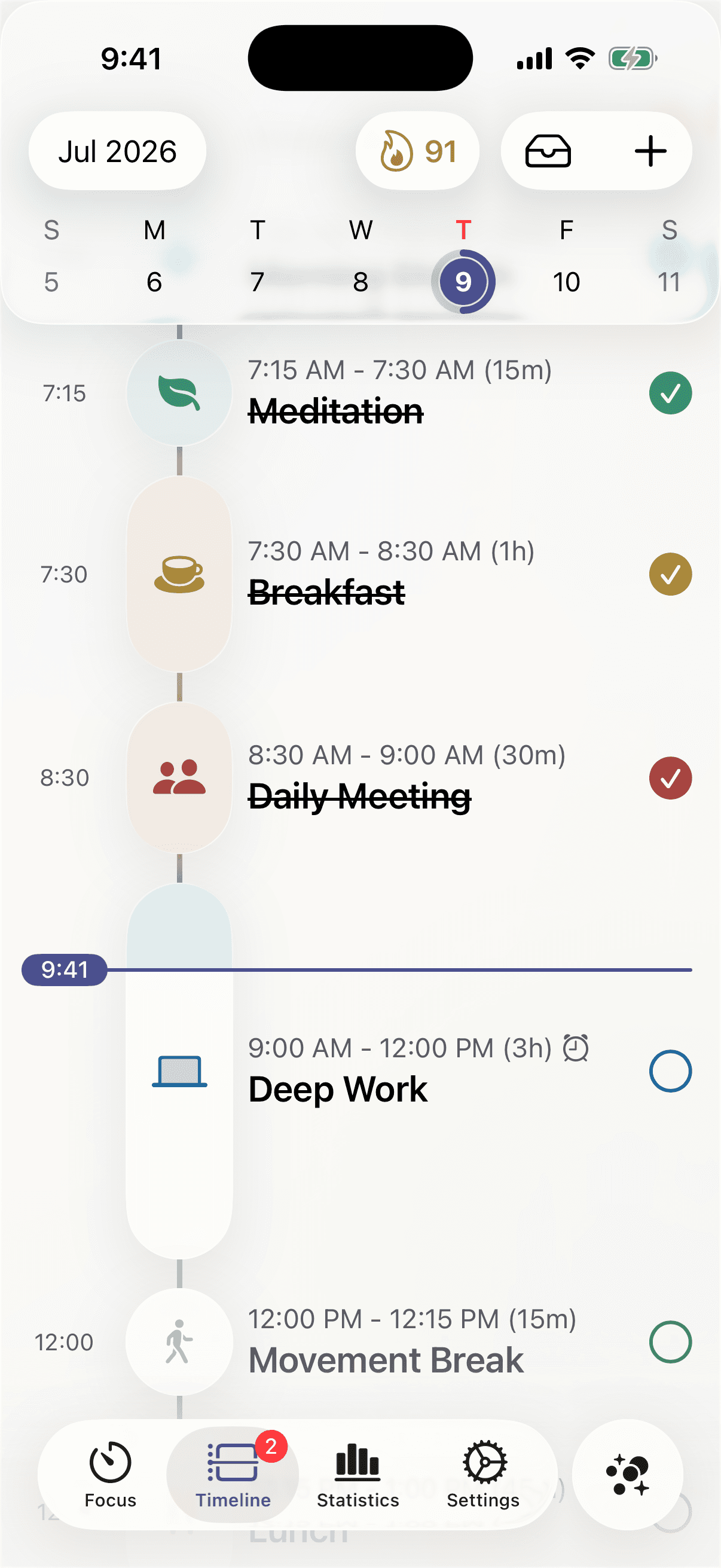
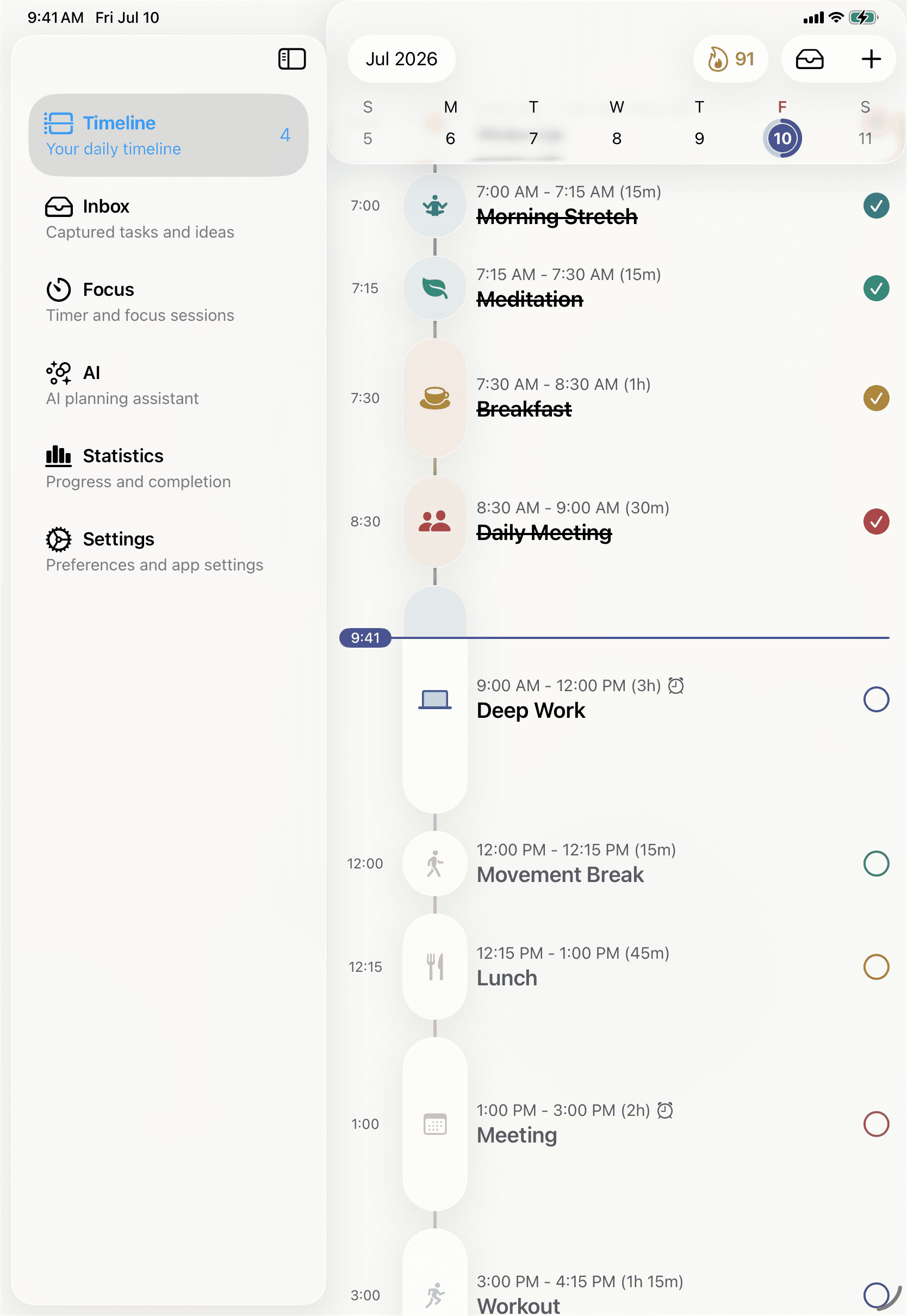
Visual timeline
See your whole day as one calm line.
Tasks, routines, and calendar events flow together on a single vertical timeline. A live marker shows exactly where you are — so time stops being invisible.
Time made visible
A moving now-line and clear durations turn an abstract day into something you can actually see.
Drag to rearrange
Move a block with your finger and the day re-flows instantly — native, smooth, forgiving.
Ten calm colours
Every activity keeps the same quiet colour, so a full day still reads as one surface.
Tempus AI
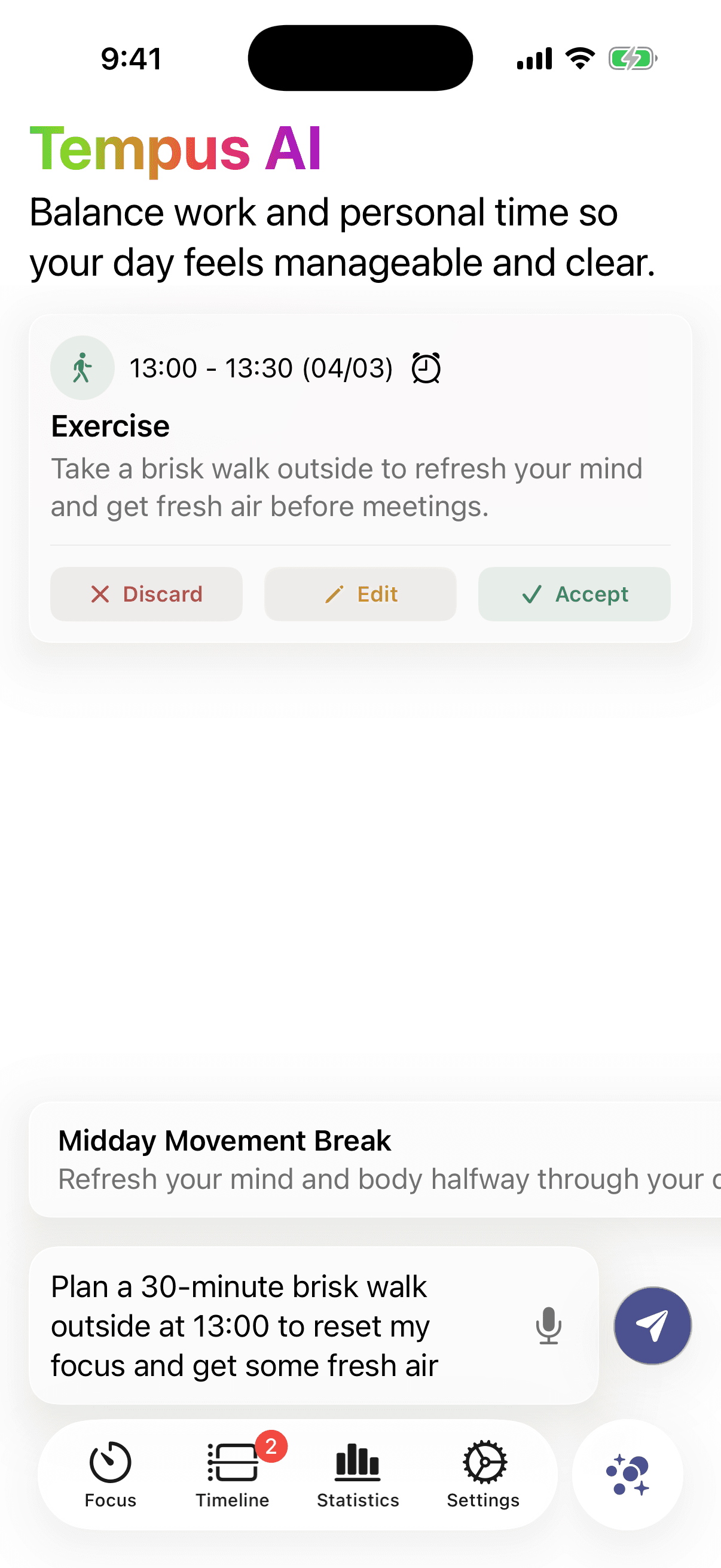
Just say it. Your day plans itself.
Speak or type what needs doing. Tempus turns it into a realistic schedule in about ten seconds — then you accept, edit, or discard each suggestion.
Voice or text
“Plan a 30-minute walk at 1pm to reset my focus.” It lands on your timeline, timed and titled.
A plan in ~10 seconds
Priorities, deadlines, and habits balanced into a day you can follow — not a wishlist.
You stay in control
Every suggestion is accept, edit, or discard. The AI proposes; you decide.
Focus Mode
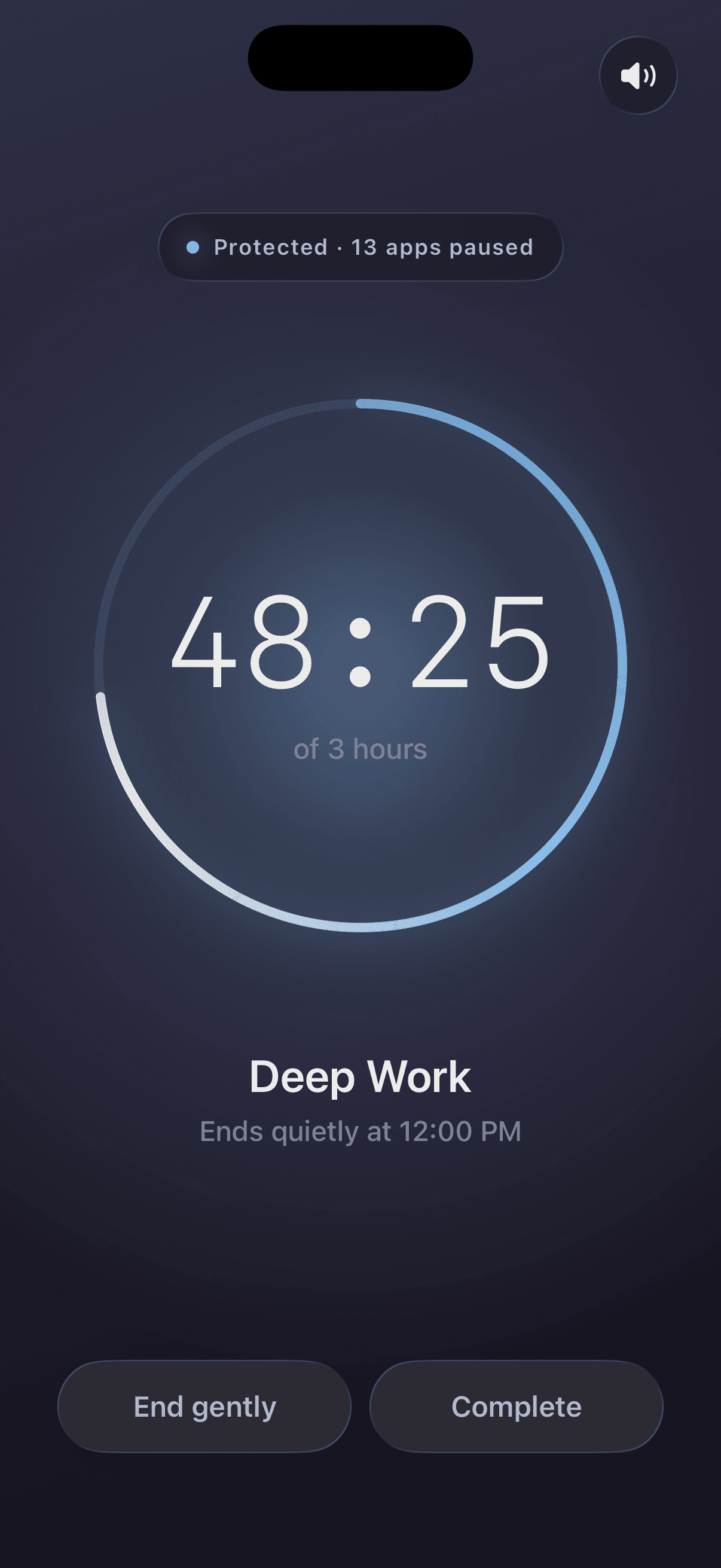
When it’s time to focus, the world dims.
Start a focus block and Tempus shifts into Twilight — a calm dark room where distracting apps are paused and a single timer counts down. It ends quietly, on its own.
Distractions paused
Block the apps that pull you off-track for the length of the session — protection, not willpower.
One bright timer
The room goes quiet and dark; the countdown is the only thing lit. That state change is the point.
Live on your Lock Screen
A Live Activity keeps time remaining glanceable without ever opening the app.
Statistics
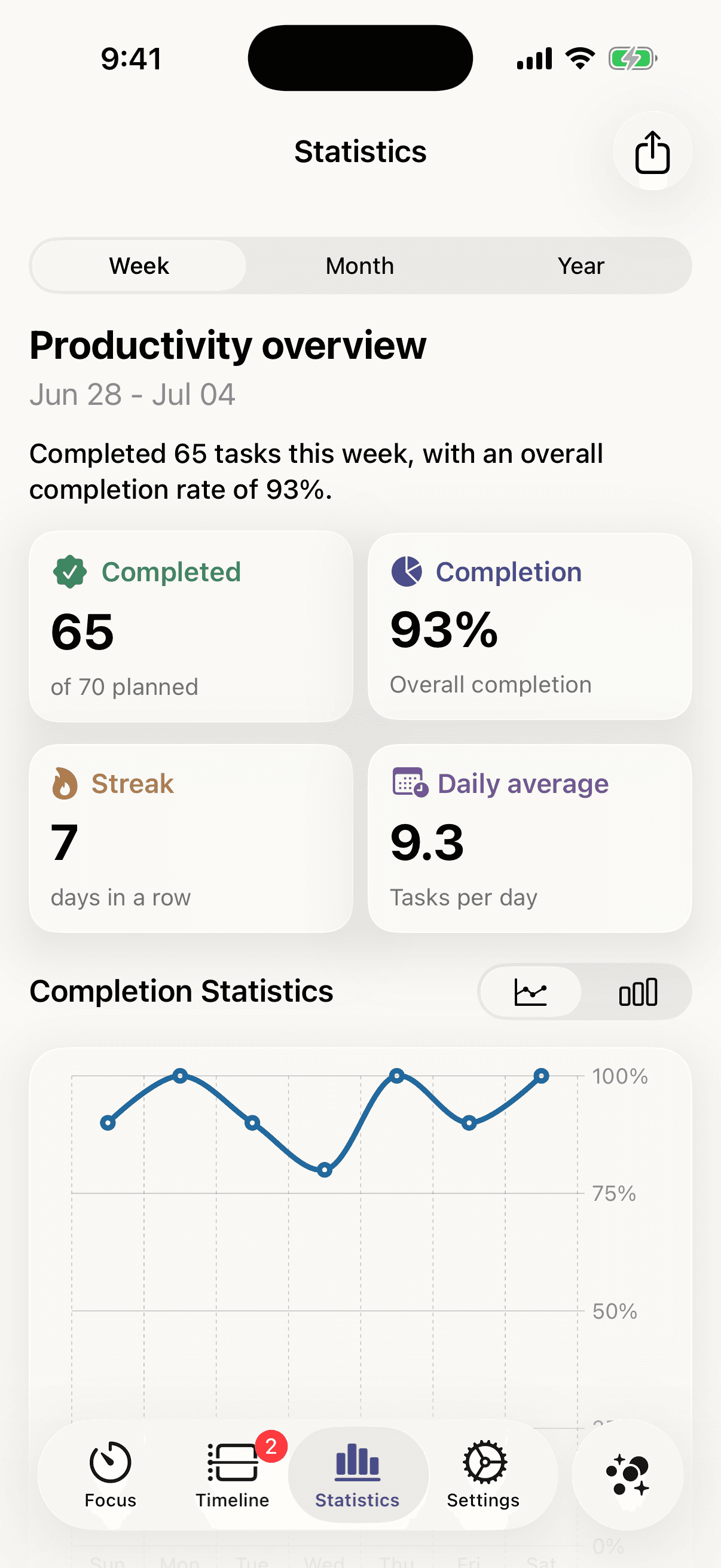
See your momentum build.
A gentle weekly overview of what you finished, your completion rate, and your streak — encouragement you can trust, never a guilt trip.
Streaks that stick
Days in a row and daily averages make consistency feel real and worth protecting.
Completion at a glance
Completed vs. planned and an overall rate — clarity on how the week actually went.
Week, month, year
Switch the range and watch patterns emerge in a clean line or bar chart.
Everything in one place
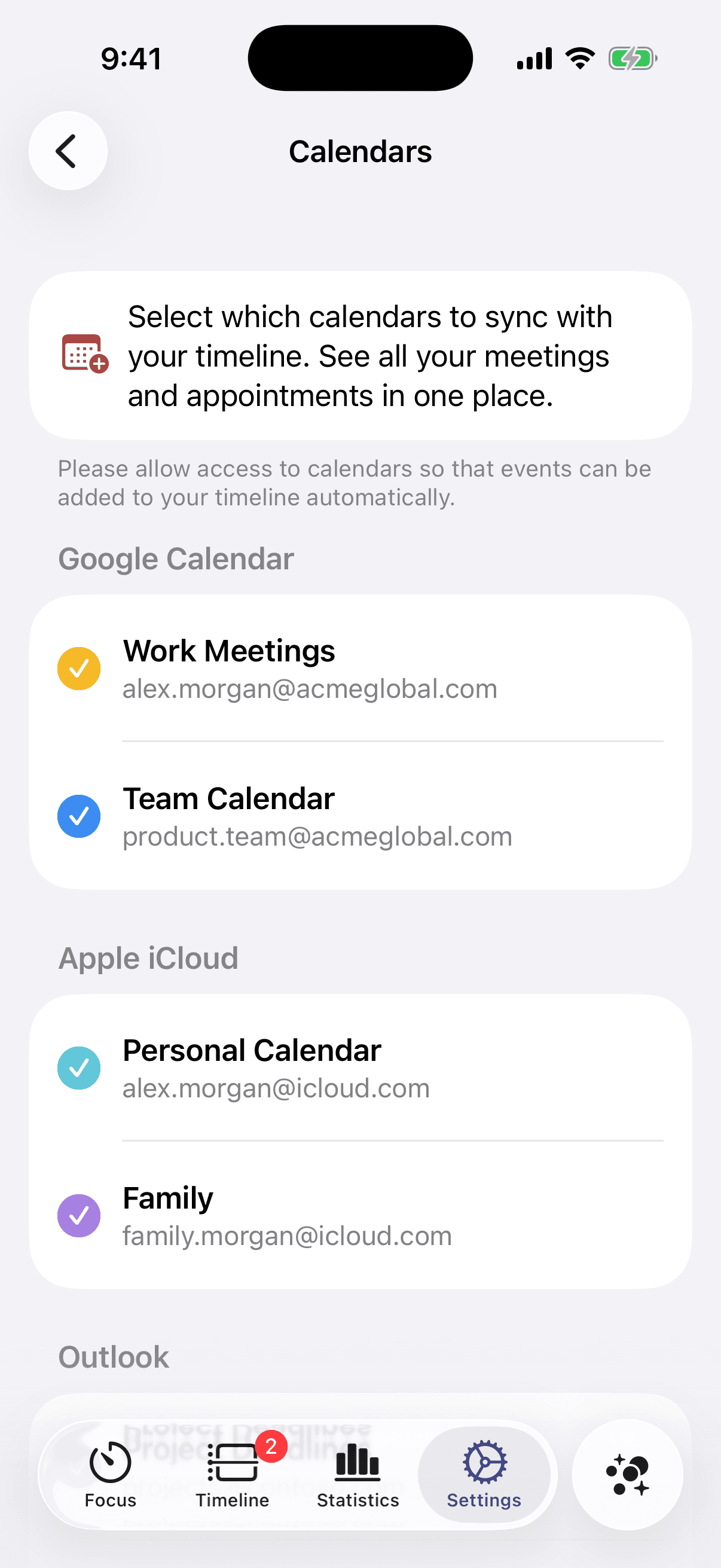
Your calendars, on the same timeline.
Sync Google, iCloud, and Outlook so every meeting and appointment sits beside your tasks — one view of the day instead of four apps.
Google, iCloud & Outlook
Choose exactly which calendars appear, each with its own colour on your timeline.
One unified day
Meetings and tasks live together, so nothing slips between separate apps.
Capture now, sort later
Drop a stray idea into the Inbox and place it on the day when you’re ready.
Still rings — even with the switch flipped.
Alarms you can’t miss
Alerts that actually reach you.
A reminder you can’t hear isn’t a reminder. Tempus alarms ring out loud — even in Silent Mode, Focus, or Low Power — so the plan you made is the plan you keep.
Rings through Silent Mode & Focus
Delivered at the system level — not a notification your phone can quietly swallow.
Countdown alarms before transitions
A gentle heads-up as a block ends, so switching tasks never feels like a jolt.
Built for forgetful days
Loud, persistent, reliable — the commitment you set is the one you actually hear.
One brand, two worlds
Paper to plan. Twilight to focus.
Calm warm daylight for laying out your day — and a protected dark room the moment you lock in. The change you feel is the point.
Paper
for planning the day
Twilight
for protecting your focus
Across your Apple devices
Plan on one device. Pick up on any.
Tempus keeps your timeline and tasks in sync over your own iCloud — no account required. Start on your Mac, glance on your Watch, adjust on your phone.
iPhone
Your day in your pocket
iPad
Plan with room to think
Mac
Plan at your desk
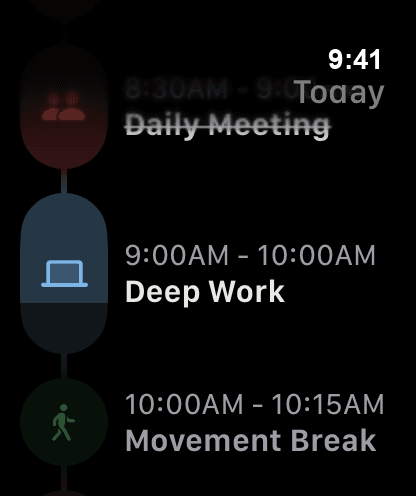
Apple Watch
What’s next, on your wrist
Widgets & Lock Screen
Your next block, without unlocking
iCloud sync
Every device in lockstep
Why Tempus
Not another to-do app with a nicer font.
Plenty of planners look good. Here’s what actually sets Tempus apart from a typical iOS planning app.
| Feature | Tempus | Typical planner |
|---|---|---|
| ADHD-first design | ||
| Voice-to-plan AI | ||
| Visual countdown alarms | Sometimes | |
| Focus Mode app blocking | Sometimes | |
| Everything in one app | 3–4 apps | |
| No account required | ||
| Works offline | Sometimes |
Privacy
Your day stays yours.
No account to make, no ads, nothing sold. Your plans live on your devices and in your own iCloud, and our Privacy Policy says exactly what leaves them, and when.
No account. No login.
Open the app and start planning — no sign-up, no password to forget.
Your devices, your iCloud
Your tasks live on your devices and sync through your private iCloud database, which we can’t access.
Apple Intelligence first
Where it can, Tempus drafts plans with Apple’s Private Cloud Compute. Otherwise our server drafts them, and doesn’t keep what you send.
Reviews
Loved by planners who’ve tried everything.
Real reviews from the App Store — no edits, no made-up names.
Finally an AI planner that works!
It creates my daily schedule in seconds and actually helps me stick to it.
Wonderful planner!
I can really see this helping me plan and schedule my daily life!
Pricing
Simple pricing. Free to start.
Try it free. Upgrade only if Tempus fits the way your brain works.
Free to start — upgrade only when you’re ready.
Free includes Tempus AI planning, the visual timeline, tasks with alarms, statistics, widgets and Apple Watch.
Monthly
$6.99/month
Get Tempus- Focus sessions that block distracting apps
- Repeating tasks and habits
- Your calendars & reminders on the timeline
- AI suggestions for free time and new tasks
- RePlan and Inbox capture
- Every alarm sound
Yearly
Save 64%$29.99/year
Get Tempus- Focus sessions that block distracting apps
- Repeating tasks and habits
- Your calendars & reminders on the timeline
- AI suggestions for free time and new tasks
- RePlan and Inbox capture
- Every alarm sound
Lifetime
No subscription$74.99one-time
Get Tempus- Focus sessions that block distracting apps
- Repeating tasks and habits
- Your calendars & reminders on the timeline
- AI suggestions for free time and new tasks
- RePlan and Inbox capture
- Every alarm sound
- Pay once, no renewals
US prices. The App Store shows the price in your country before you buy. One purchase covers iPhone, iPad, Mac and Apple Watch. Subscriptions renew until you cancel them in your Apple Account settings — see the Terms.
Is Tempus designed for ADHD?
How does Tempus AI scheduling work?
Will I actually hear the alarms?
Can I sync Tempus across my iPhone, iPad, and Mac?
Can I see my schedule without opening the app?
Can I customize my timeline view?
What happens to my data?
Does Tempus work offline?
How does habit tracking work in Tempus?
Ready when you are
Start planning with a brain-friendly app
Voice-to-plan AI, a visual timeline, and alarms you can't miss. Free to try on iPhone, iPad, and Mac.
Free to try. No setup required.
Alarms you can’t miss
Loud, reliable — even in Silent Mode.
A plan in ~10 seconds
Speak your goals, get a real schedule.